Ultimate The Finals Cheats

THE FINALS Cheats & Hacks for PC. Aimbot, Player & Bot ESP, Radar and more.

Explore THE FINALS Cheats for your windows PC. It includes customizable Aimbot, Player ESP, Bot ESP, and 2D Radar. You can Fine-tune targeting with adjustable FOV and smoothness, track players and AI with detailed ESP indicators, and customize radar settings for improved in-game awareness.

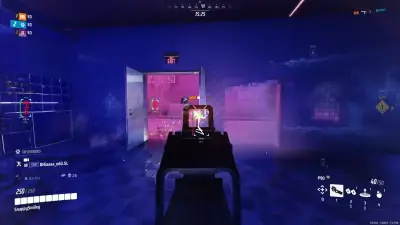
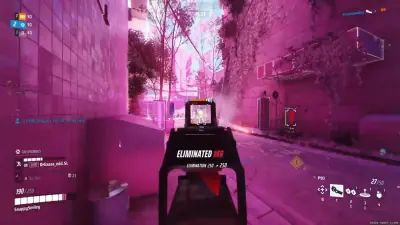
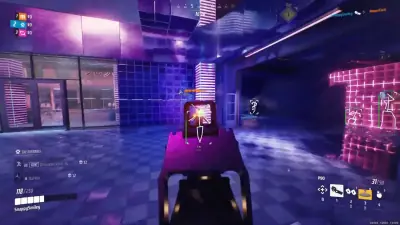
First-person view of a neon arena with player outlines and distance indicators.

Yes

Stream-safe

<24h

Patch speed

300+

Users

24/7

Support

Custom FOV
Visible Check
Player ESP
Bot ESP
Skeleton
Health ESP
2D Radar
Custom Crosshair
Menu Keybind
Windows 10 & 11
HVCI enabled
Core Isolation enabled
TPM enabled
Secure Boot enabled
Cloud DMA optional; required for some features
Custom FOV
Visible Check
Player ESP
Bot ESP
Skeleton
Health ESP
2D Radar
Custom Crosshair
Menu Keybind
Windows 10 & 11
HVCI enabled
Core Isolation enabled
TPM enabled
Secure Boot enabled
Cloud DMA optional; required for some features

Features

THE FINALS Cheats Features

Explore customizable Aimbot, Player ESP, Bot ESP, and Radar features for THE FINALS. Adjust targeting, visual indicators, and interface settings to suit your gameplay preferences.

Aimbot

Custom Targeting & Aim Controls

Fine-tune aim assistance with customizable targeting, bone selection, and activation settings.

  • Custom FOV: Adjust the targeting area.
  • Visible Check: Target visible entities only.
  • Aim Always & Aim Bind: Customize activation.
  • Target Selection: Player, Bot, Team, and Coma.
  • Bone Selection: Closest, Random, or Selected.
  • Smoothness: Adjust aim movement.
  • Max Distance: Set targeting range.
  • Draw FOV: Display the FOV circle.

Visual ESP

Player, Bot & Teammate ESP

Customize visual indicators to display entity positions and in-game information.

  • Player ESP: Display player information.
  • Bot ESP: Identify AI-controlled entities.
  • Teammate ESP: Show teammate indicators.
  • Box & Skeleton: Highlight character positions.
  • Snapline & View Line: Add visual tracking lines.
  • Health ESP: Display health information.
  • Name & Distance: Show names and distances.

Radar

Customizable 2D Radar System

Track supported entities with an adjustable radar and customizable display settings.

  • Show Player: Display player indicators.
  • Show AI: Include AI entities.
  • Show Team: Show teammates.
  • Radar Zoom: Adjust radar magnification.
  • Transparency: Control radar visibility.

Miscellaneous

Additional Customization & Menu Controls

Personalize the interface with convenient display, language, and shortcut settings.

  • FPS Limit: Set the frame-rate limit.
  • Custom Crosshair: Adjust style, size, and thickness.
  • Menu Language: English and Chinese.
  • Menu Keybind: Set the menu shortcut.
  • Unload Keybind: Configure the unload shortcut.

AIMBOT FEATURES

Customizable Aimbot & Advanced Targeting

Configure your aim assistance with flexible activation controls, customizable FOV, and target selection. Fine-tune bone preferences, visibility checks, smoothness, and maximum targeting distance to customize your aiming setup.

Aim Activation

Flexible Aimbot Activation Controls

Control when and how the Aimbot activates using dedicated toggles and customizable keybinds.

  • Enable or disable Aimbot independently.
  • Configure Aim Always for continuous activation.
  • Assign a custom Aim Bind.
  • Manage your preferred activation method.

FOV & Visibility

Custom Targeting Area & Visibility Checks

Customize the targeting area and configure visibility checks to control which opponents can be considered for targeting.

  • Adjustable Field of View (FOV).
  • Enable or disable Visible Check.
  • Display the targeting area with Draw FOV.
  • Customize the effective targeting area.

Target Selection

Choose Your Preferred Target Categories

Configure which entity categories the Aimbot can consider when selecting targets.

  • Player targeting.
  • Bot targeting.
  • Team targeting.
  • Coma target category.

Bone Selection

Customizable Character Target Points

Choose how the Aimbot selects character bones for targeting, with multiple selection modes available.

  • Closest bone selection.
  • Random bone selection.
  • Selected bone mode.
  • Customize your preferred targeting point.

Aim Customization

Fine-Tune Aim Movement & Distance

Adjust aim smoothness and maximum targeting distance to configure the Aimbot's movement behavior and engagement range.

  • Adjustable aim smoothness.
  • Custom maximum targeting distance.
  • Fine-tune aim movement behavior.
  • Configure your preferred targeting range.

VISUAL ESP FEATURES

Player, Bot & Teammate ESP

Get additional visual information about supported in-game entities with customizable ESP indicators. Configure player and bot visibility, display character outlines, and monitor health, names, and distance through individual visual options.

Entity ESP

Player, Bot & Teammate Detection

Configure separate ESP options for different entity categories to organize the information displayed during gameplay.

  • Player ESP for player entities.
  • Bot ESP for AI-controlled entities.
  • Teammate ESP for friendly players.
  • Independently manage available entity indicators.

Box & Skeleton ESP

Detailed Character Visualizations

Use box and skeleton indicators to display additional visual information about supported characters.

  • Box ESP for character boundaries.
  • Skeleton ESP for skeletal indicators.
  • Customize your visual ESP configuration.
  • Combine both indicators in your display.

Snapline & View Line

Additional On-Screen Visual Indicators

Configure Snapline and View Line options to add more visual references to your ESP interface.

  • Enable Snapline indicators.
  • Configure View Line indicators.
  • Customize available visual elements.
  • Combine indicators with other ESP options.

Player Information

Health, Name & Distance Indicators

Display additional information about supported entities through individual player-information indicators.

  • Health indicators for player status.
  • Name ESP for entity identification.
  • Distance indicators for range information.
  • Customize which information appears on screen.

RADAR FEATURES

Customizable 2D Radar System

Configure an additional radar display for supported players, AI entities, and teammates. Customize entity visibility, adjust radar zoom, and control transparency to create a radar layout that suits your preferences.

Entity Radar

Player, AI & Team Indicators

Choose which entity categories appear on the Radar to customize the information displayed in your radar interface.

  • Show Player indicators.
  • Show AI entities.
  • Show Team indicators.
  • Configure entity visibility individually.

Radar Controls

Flexible Radar Display Management

Control the Radar interface with dedicated activation and display customization settings.

  • Enable or disable Radar.
  • Adjust radar zoom levels.
  • Customize radar transparency.
  • Fine-tune your preferred radar appearance.

ADDITIONAL FEATURES

Crosshair, Performance & Menu Customization

Personalize additional software settings through the Miscellaneous menu. Adjust FPS limits, customize your crosshair, select your preferred interface language, and configure menu and unload keybinds.

FPS Configuration

Customizable Frame Rate Limit

Configure the FPS Limit setting through the Miscellaneous menu to customize the software's available frame-rate configuration.

  • Adjustable FPS limit.
  • Configure your preferred frame-rate setting.
  • Dedicated performance configuration option.

Custom Crosshair

Personalized Crosshair Appearance

Configure the custom crosshair with adjustable appearance settings to personalize its on-screen presentation.

  • Enable or disable Custom Crosshair.
  • Choose an available crosshair style.
  • Adjust crosshair size.
  • Customize crosshair thickness.

Menu & Interface Controls

Language Selection & Custom Keybinds

Personalize your cheat menu with language preferences and dedicated keyboard shortcuts for convenient interface access.

  • English and Chinese menu languages.
  • Custom Menu Keybind.
  • Dedicated Unload Keybind.
  • Configure your preferred keyboard shortcuts.

Store

Our products

Compare the cheat menu and the utilities on this grid. Open a product page for the feature list and checkout.

HWID Spoofer for The Finals PCs

Disk serials, MAC addresses, and GPU IDs get a new pass. The cleaner in the license runs before the next sign-in.

After a hardware flag, this license rewrites disk serials. It also rewrites MAC addresses, GPU IDs, and related fingerprints. Trace cleanup is in the same license.

  • Disk serial rewrite
  • MAC rewrite
  • GPU ID rewrite

Cloud DMA

A Hyper-V environment for one Windows PC with guided installation and encrypted activation.

Cloud DMA requires GREENWARD, Static Server and AWS as separate purchases. Confirm the full setup and THE FINALS compatibility before ordering.

  • Single-PC setup
  • Guided Hyper-V installation
  • Encrypted activation

Client Skin Changer for Supported Titles

Weapon skins and outfits, drawn on this PC, without a separate purchase for each cosmetic.

Cosmetic customization for supported titles. THE FINALS support is not explicitly confirmed; ask support before purchasing for this game.

  • Weapon finish looks
  • Outfit looks
  • Knife style looks

Why us

Features and support for The Finals

Explore the targeting controls, visual tools and product guidance available before checkout.

  • Loader updates after patches

    New builds available within hours after The Finals or Elytra update. Check the current product status on discord before you queue.

  • Smooth aimbot defaults

    Aimbot smoothness, FOV and bone selection are configured for you. You can adjust these settings to your liking.

  • 24/7 Discord support

    Support is available around the clock for product, order and setup questions.

  • External loader with streamproof mode

    The external loader includes a streamproof mode in the cheats menu. This mode prevents the loader from being detected by the anti-cheat.

  • Save and load configurations

    Save your menu settings and load them again using the configuration options.

  • HWID resets

    Hardware resets and license moves go through Discord. Most shops lock you to one PC.

<24h

Patch turnaround

Usual time to ship a loader after a major THE FINALS or Elytra update.

24/7

Support

Discord help for setup, configurations and account issues.

300+

Users

PC players using aimbot, ESP and tools on finalscheats.com.

Setup guide

Before ordering, review your complete setup

Read the feature list and requirements, confirm unresolved compatibility questions, then review the destination checkout.

  1. Review the feature list

  2. Confirm compatibility

  3. Review purchase options

How it works

From product research to an informed purchase.

Review the complete configuration before choosing an access option.

4 checks before purchase

  1. 01

    Read the feature list

    Review targeting, ESP, Radar and interface options on the main product page.

  2. 02

    Check your Windows setup

    Check Windows 10 or 11 and the required HVCI, Core Isolation, TPM and Secure Boot settings.

  3. 03

    Ask about the complete configuration

    Confirm where THE FINALS runs with Cloud DMA and account for GREENWARD, Static Server and AWS.

  4. 04

    Review the destination checkout

    Check current pricing, access terms and delivery details with the seller before paying.

Blog

Guides and updates

Feature explanations, Windows requirements and gameplay guides for The Finals.

Review the relationship between Cloud DMA's described Hyper-V environment and THE FINALS' official virtual machine restrictions before making a purchase decision.

Review the listed Windows compatibility and security requirements for THE FINALS software before purchasing or attempting setup.

Learn how THE FINALS aimbot settings work, from customizable FOV and smoothness to bone selection, visibility checks and activation binds.

System requirements

Check your PC before purchasing

Review the Windows security settings and separate requirements for the supported configuration.

Windows

Windows 10 or Windows 11, 64-bit.

Windows security

HVCI and Core Isolation must be enabled.

Firmware security

TPM and Secure Boot must be enabled.

Cloud DMA

Optional; some features require this separate purchase.

Support

Need a hand with your setup?

Find answers to common questions or contact support about an order, compatibility, or a technical issue.

Before you reach out

Details that help us help you

  1. 01

    Order details

    Include your order number when asking about a purchase.

  2. 02

    Your setup

    Name the product and your Windows version.

  3. 03

    What happened

    Share the exact error message or a relevant screenshot.

FAQ

Questions about this page

Answers for this page. The FAQ page holds the rest.